

Protecting Your Practice: Tips to Outsmart Phishing Scams and Secure Your Passwords
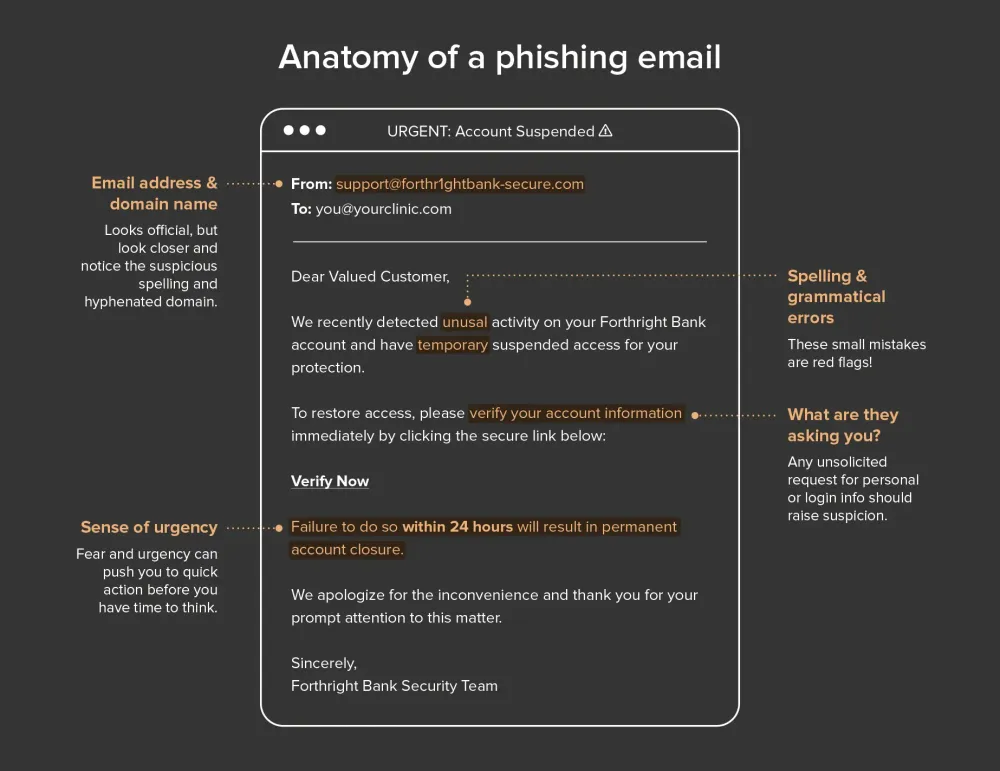
Imagine you get an email from your bank warning you of suspicious activity. They’re asking you to log in and verify some recent purchases.
No problem. You can trust your bank. Right?
Unfortunately, it’s not that simple. That email in your inbox might look like it’s from your bank — but it could be a phishing email scam designed to fool you into handing over your login credentials. One click, a few keystrokes, and just like that, you’ve unknowingly handed the keys to your account over to an attacker.
This is the essence of phishing scams in healthcare and beyond: communications that appear to come from a trustworthy source, but are actually a fraudulent attempt to gain access to sensitive information.
For clinic owners and health practitioners, cybersecurity threats like phishing are among the most common risks to account safety. So, the first step to keeping your accounts safe and secure means being aware of what social engineering or "phishing" emails look like.
A weak password equals big risk
Let’s picture another scenario.
Let’s say you’re a solo chiropractor who’s juggling a packed schedule. Every day you’ve got back-to-back patients lined up, and you barely have time to grab a coffee before work each morning.
Passwords are the last thing on your mind. To keep things easy, you cycle between the same three you’ve been using forever. Each time you reuse one, you tweak it a tiny bit. For instance, the account password for your clinic? It’s just a variation of the one you used for LinkedIn years ago.
Safe enough, right?
What you might not realize is that LinkedIn suffered a major data breach several years ago, which means your old passwords have been floating around on the dark web for just as long, waiting for someone to exploit them. All it takes is one hacker with a little time on their hands and a basic set of tools. Cross-referencing your email and old password from the data breach takes only seconds. With a few guesses, they figure out your slight "tweak" to the old password and gain access to your email account.
You’re too busy running the clinic and focusing on your patients to notice. But the hacker doesn’t stop there. Digging through your inbox, they uncover your clinic’s account details, which, unfortunately, use the same password. Even worse, you haven’t enabled two-factor authentication for extra login security (more on that soon). Seizing the chance, they reroute your payments straight into their own account.
A few days later, you finally catch on. Checking your bank account, you feel the floor drop out beneath you. Thousands of dollars are gone.
This scenario is a hypothetical one, but it’s all too easy to see how things could go south without the proper password security practices in place.
If you’ve struggled to remember multiple strong passwords, you’re not alone. The human brain isn’t built to juggle dozens of unique logins. That’s why many of us default to using the same password, over and over again, with tiny tweaks. But in today’s digital threat landscape, tiny tweaks aren’t enough. Attackers are betting on patterns.
So, what can you do?
The secret to managing multiple accounts
The best way to simplify security and continue to stay protected is by using a password manager. A password manager remembers all your passwords for you, so you only need to keep track of two:
- Your device login
- The master password for your password manager (say that 10 times fast!).
Once you’re using a password manager, you can generate unique, super-strong passwords for every account — so even if one gets compromised, the rest stay safe and your clinic’s data security remains intact.
Passphrases: Easier to remember, harder to crack!
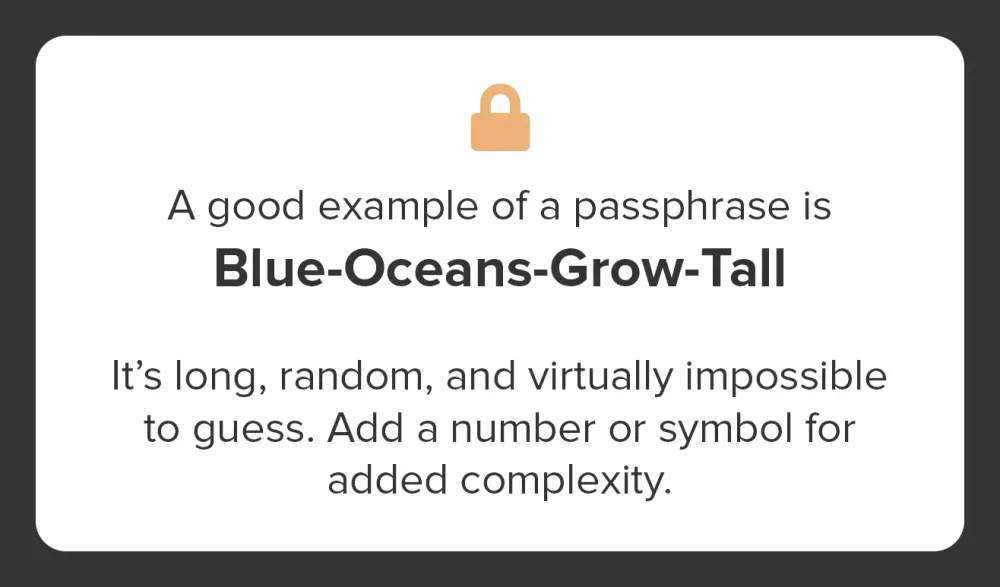
A password manager is one of the best tools you have to keep your accounts secure, but here’s the catch: you’ll still need to remember at least two passwords. These are your master keys, so they’ve got to be strong. That means ditching the usual shortcuts like birthdays, anniversaries, or your dog’s name. The good news? There’s a simple way to boost your password security without making life more complicated. Instead of struggling with short, complex passwords (like Tr!9x$2p), try using a passphrase — this is a longer sentence that’s easy for you to remember but nearly impossible for attackers to crack.
A good passphrase should be personal yet unpredictable. The four words you choose can mean something to you (making them easier to remember), but they shouldn’t have any obvious connection to each other that an attacker could guess. And here’s a fun fact: when it comes to creating a strong passphrase, length, not complexity, is your real defense — so make sure to use at least four random words.
Verification so nice, they require it twice
These two factors typically include:
- Something you know: A password or PIN.
- Something you have: A physical device like a smartphone, security token, or authentication app.
- Something you are: Biometric data like a fingerprint, facial recognition, or voice recognition.
For example, after entering a password, a user might receive a one-time code on their phone or need to scan their fingerprint to complete the login process. Think of two-factor authentication as your digital deadbolt. Even if someone guesses your password, they can’t get in without that second layer of login protection.
If you’re using an EMR platform for clinic management, turning on two-factor verification is a simple but powerful way to add an extra layer of protection to your account. Here’s how to do that in Jane.
The takeaway
Protecting your clinic doesn’t require a degree in cybersecurity. You can build a solid line of defense by making simple changes: using a password manager, swapping passwords for strong passphrases, and enabling two-factor authentication (2FA). And the next time a suspicious email finds its way into your inbox, you’ll know to pause before you act, and look out for the signs of phishing. Cyber threats may be evolving, but with these proactive clinic cybersecurity best practices, so are you.
This article was originally published in volume 5 of Front Desk magazine and has been modified and updated.