

Using an AI Scribe: How to Talk to Clients & Get Consent
AI is having its moment, and healthcare is no exception. Somewhere around 500–600 million people are actively using AI every day to do things like plan meals, summarize search results, send the perfect break-up text, and even write clinical notes. Artificial intelligence is showing up in every corner of life, and one fast-growing use case in the professional world is AI-powered medical scribe software to help with clinical notes.
AI scribes are helping practitioners simplify documentation, reduce after-hours admin, and focus more fully during their sessions. But while this kind of AI medical scribe quietly supports the work behind the scenes, it’s important to remember to keep clients in the loop too. Most clients don’t need a deep dive into the tech, they just want to know what it means for their care.
This guide breaks down how to talk to clients about using AI scribe tools in your practice, including how to answer common client questions, capture informed consent, and what to keep in mind when thinking about compliance. You’ll also find a downloadable decision tree to help you navigate following consent best practices in your clinic, plus a quick FAQ at the end that you can refer back to any time.
What clients want to know about AI
Not every client will have questions about your use of AI scribe software, some will just nod and move on. But for those who are curious (or cautious), it helps to be ready with answers that are clear, thoughtful, and grounded in how your clinic actually works.
Here are some questions to prepare for:

🎙Is my session being recorded?
This one comes up a lot, especially in settings like therapy, where clients may be sharing sensitive details. Be prepared to explain clearly how recording works at your clinic. You might explain that with your scribe tool, recording isn’t automatic, it’s something you choose to start and stop manually when needed. It also helps to walk them through your policies for how long recordings are stored until they’re deleted. A quick outline of the tool’s features and the policies behind the tool helps people feel more informed and included in all aspects of their care.
🧠 Is the AI tool diagnosing or replacing care?
No, and it’s worth saying that clearly. Let clients know that AI is simply a tool working in the background, helping to speed up note-taking. You’re still the one making all clinical decisions. Let them in on how a scribe software is supporting you with your clinical notes. Maybe it gives you more presence in the room, or helps you finish documentation before the day’s over. Being open about how and why you use a scribing AI can go a long way in helping clients feel informed and reassured.
🙅Can I decline the use of a scribe AI in my session?
Clinicians and practitioners tell us the answer should be: absolutely. Clients should always feel like they have a say in their care, and opting out of scribe AI tools should be easy and judgment-free. If a client prefers not to have AI involved in their care or clinical notes, that’s totally okay. Empathize with the hesitation. You might find that with time (and a little more understanding), they’ll come around. But either way, their comfort and consent come first.
How to capture informed consent for AI scribe use: scripts and helpful tips
You might be wondering: do I need client consent to use an AI scribe? In short, yes. Client consent is strongly recommended (and in many cases, required) when using any AI documentation tool in your practice. Depending on your region and profession, regulations like HIPAA, PIPEDA, or GDPR may apply, which emphasize the importance of informed consent when client data is being recorded, processed, or stored.
That said, the specific requirements for consent and advice for using AI tools responsibly can vary depending on your region, discipline, and regulatory body. For a very basic look at how AI use is being guided in practice, here are a few examples from across North America:
- The College of Physiotherapists of Ontario lists key principles for responsible AI use in physiotherapy, including transparency, consent, professional accountability, understanding bias, data security, and ongoing training.
- The American Physical Therapy Association outlines how AI can be used to support care when it aligns with professional judgment, client engagement, scope of practice, and other core standards.
- The BC Association of Clinical Counsellors provides a guide for AI use in clinical practice, covering topics ranging from legislative compliance and consent considerations to data storage and how to responsibly sunset AI tools.
- The American Counseling Association offers recommendations for using AI ethically in therapy, including ensuring clients understand what AI tools can and can't do, protecting privacy, avoiding use for diagnosis, and making sure licensed professionals remain accountable for care.
If you're in an unregulated discipline but still want to stay thoughtful about how you use AI tools, you're not alone. Many practitioners are looking to peer discussions and early guidance from related associations to help shape their approach. Community forums are a great place to see what others in your field or region are trying out and sharing as best practices in their own clinics.
So, how do you approach consent for your AI scribe in real life?
Start with your forms
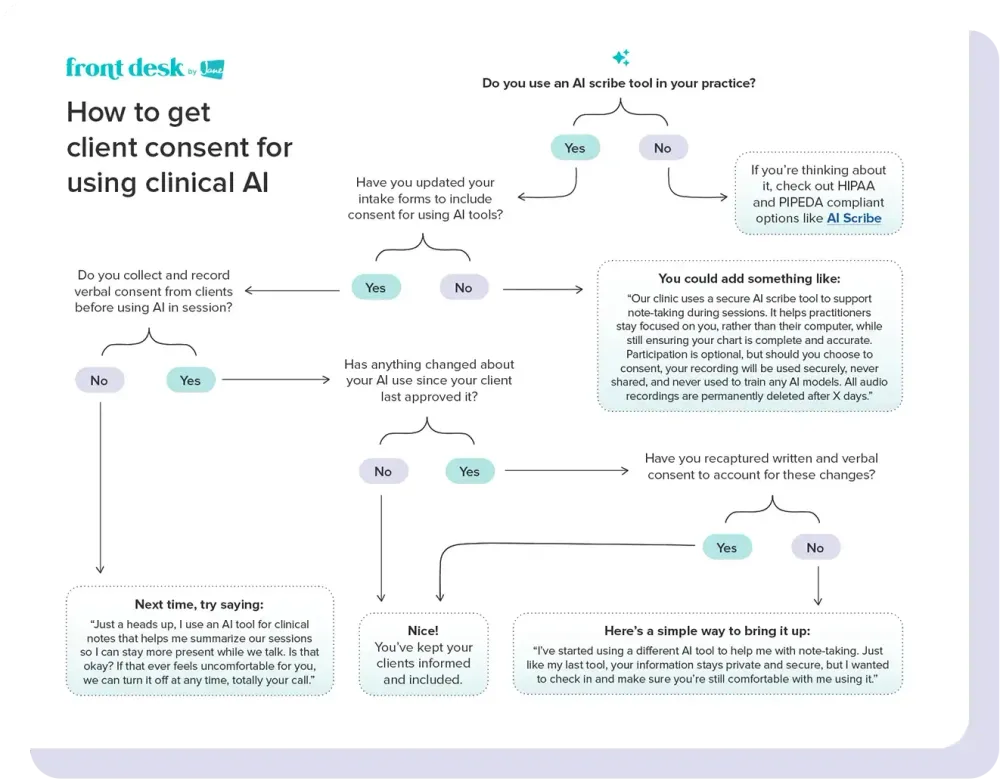
The easiest place to gather consent is through your existing new client intake process. Add a section to your digital or paper forms that clearly explains how you’re using your clinical scribe tool and why.
For current clients, you’ve got a couple of options. If you use an EMR like Jane, you can send out updated online intake forms. Or you can decide to create a simple, standalone consent form to be filled out when your client comes in. Either way, just be sure to include a short explanation on how the AI tool fits into your process and what happens to any audio recordings collected.
💬 Stuck on the wording? An idea to get you started:
“Our clinic uses a secure AI scribe tool to support note-taking during sessions. It helps practitioners stay focused on you, rather than their computer, while still ensuring your chart is complete and accurate. Participation is optional, but should you choose to consent, your recording will be used securely and never shared. All audio recordings are permanently deleted after X days.”
💡 If you want a head start, we've got free AI Scribe consent form templates you can adapt for your clinic's needs.
Then verbal consent: say it out loud
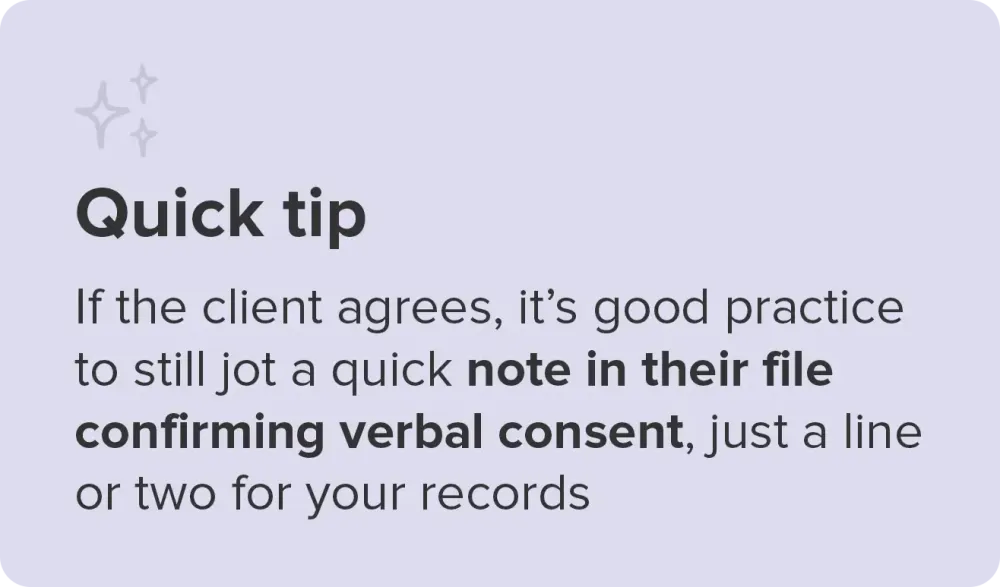
Even if it’s in the paperwork, it’s worth bringing up in session. People are busy, and let’s be honest, we’ve all clicked “I agree” without reading every detail. A quick verbal check-in gives clients a chance to ask questions or opt out if they’re not comfortable. You don’t need a whole script, just keep it honest and human.
💬 Here’s a simple way to say it:
“Just a heads up, I use an AI tool for clinical notes that helps me summarize our sessions so I can stay more present while we talk. Is that okay? If that ever feels uncomfortable for you, we can turn it off at any time, totally your call.”
Return to the conversation as needed
If, down the road, you start using a new clinical AI tool or start applying it to different session types, it’s important to keep clients informed. Consent isn’t something you collect once and forget about. It’s something you revisit, especially as medical scribe tools evolve or if you change how you’re using them. Revisiting client consent for AI is good practice, both ethically and clinically.
💬 If you’re switching tools, it could be something like:
“I’ve started using a different AI tool to help me with note-taking. Just like my last tool, your information stays private and secure, but I wanted to check in and make sure you’re still comfortable with me using it.”
To help with real-world moments, we’ve put together a consent-for-AI decision tree. Download your own PDF copy here if you want to keep it handy.
FAQ guide to AI scribe consent, client communication, and AI healthcare compliance
Here’s a rapid-fire summary of the most common questions that come up when discussing AI with clients and what’s helpful to keep in mind when answering them.
Can clients refuse AI-assisted note-taking?
Yes. Clients should always be able to say no, and that choice should be easy, clear, and judgment-free. If a client isn’t comfortable with live recording, some AI scribes allow you to dictate notes afterward, so you can still use features like summarizing or formatting without recording the session. But if a client doesn’t want AI involved in their care at all, you shouldn’t use it. Follow your professional guidelines, and when in doubt, let the client’s preferences lead.
How do I know if an AI scribe is secure and compliant?
It depends on the tool and its intended use, but look for a secure medical or clinical-specific AI software. It’s best to look for an AI scribe built specifically for healthcare practitioners, and that includes safeguards like encrypted data storage, region-specific data centers, and clear policies outlining how client data is handled. You should be looking for tools that are compliant with the privacy regulations that apply to your practice (whether that’s HIPAA, PIPEDA, GDPR, or another framework), and take time to review their security and privacy practices before bringing the tool into your clinic. If you're a therapist in the US or Canada, you can read more in our guide to HIPAA and PIPEDA requirements for therapists using AI scribes.
Does AI replace the practitioner’s role in documentation?
No, not completely. Using a scribe AI can help speed up your clinical note-taking by generating detailed summaries and applying consistent formatting. However, the practitioner must still be the one reviewing, editing, and finalizing those notes. The responsibility for accurate, quality documentation remains with the practitioner.
How do I get client consent for using AI?
Start by checking with your college, association, or licensing body to understand any specific standards for your profession. From there, the simplest approach is to add a short explanation to your intake forms to capture written consent, then follow up in session with a quick verbal check-in. The goal is to keep clients informed, reassured, and involved in the decision.
What if a client is unsure or uncomfortable with AI?
That’s totally okay. Many clients are still learning about AI tools in healthcare. Try explaining what the tool does and how it helps you, but make space for their concerns. Let them know it’s optional and that they can change their mind at any time.
Can I delete AI-generated clinical notes or recordings?
Yes, most healthcare-focused tools give you control over deletion, whether that’s immediate, after a set number of days, or manually managed. This helps support both transparency and data privacy.
Last stop: something from someone who's tried it
If you’re curious how clients might respond when you introduce an AI scribe, physiotherapist Sean Overin has found that honest conversation goes a long way:
“Clients have been surprisingly open, especially when you're transparent,” he says. “Some even comment on how progressive it feels [using AI] and appreciate the extra focus and energy in the session.”
You can read more of Sean’s story here, including his advice for getting started with AI and the small changes that led him to feeling less fatigued at the end of the day.
Sean uses Jane’s AI Scribe, which was shaped by feedback from clinics like his. So, if you’re thinking about an AI tool to help with your documentation, it's worth checking out.
And that’s a wrap! We’ve covered AI, documentation, consent, and compliance — all in one go. You made it. Consider this your digital high-five and a little treat for the road. 🍬
📚Want to learn more about AI? Sign up for our Understanding AI in health and wellness webinar.
If you're curious about how others are putting AI to work in their practices, here are some resources our partners have shared with us:
